


Quick answer
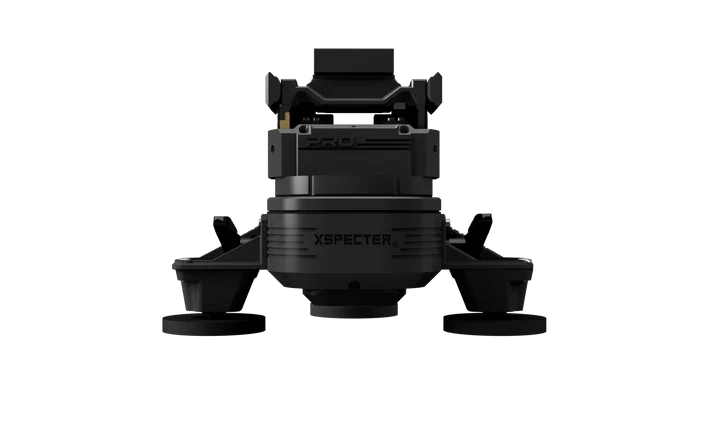
XSPECTER T-CROW PRO 2 USB-C: Heavy-Duty Remote Scanning With Your Own Thermal or Night Vision Optic Short answer: The XSPECTER T-CROW PRO 2 USB-C is the harder-use T-CROW for buyers who expect frequent, demanding stationary...
Who this is for
Best for
Buyers who want a purpose-built thermal setup matched to a real hunting, scanning, or surveillance use case.
Not ideal for
Buyers whose real use case is better served by a simpler or cheaper format.
Quick specifications
- Category
- Accessory
Why buy from Thermal Bros
Thermal Bros treats accessories the same way we treat optics: with honest guidance on what actually matters and what can wait. That keeps buyers from spending money on add-ons before the core setup is right.
Full product description
XSPECTER T-CROW PRO 2 USB-C: Heavy-Duty Remote Scanning With Your Own Thermal or Night Vision Optic
Short answer: The XSPECTER T-CROW PRO 2 USB-C is the harder-use T-CROW for buyers who expect frequent, demanding stationary scanning from a truck, UTV, blind or fixed observation point. It combines a reinforced carrier, metal gears, PRO adjustment hardware, a 5,000 mAh battery and USB-C Powerport output for a compatible attached device.
A thermal or night vision camera is not included. The PRO 2 carries and moves a compatible handheld. Your optic still determines image quality, resolution, lens performance, detection capability, zoom, recording and live-video behavior.
For most hunters, the PRO 2 is not the automatic starting point. Choose it when its longer listed runtime, reinforced construction and harder-use adjustment hardware solve a real problem. If a standard T-CROW already handles your optic and use case, paying for PRO hardware is unnecessary.
Who Should Buy the T-CROW PRO 2 USB-C?
- Hog and predator hunters running long stationary scanning sessions from a truck, UTV or fixed observation point.
- Ranchers, landowners and recovery teams who expect frequent use and want a more heavily built carrier.
- Buyers who already own a good compatible handheld and want to reuse that optic instead of purchasing another thermal sensor.
- Users who need longer carrier runtime: the 5,000 mAh battery is listed for approximately 10–12 hours of operation.
- Users who want USB-C accessory power for a compatible thermal or night vision handheld.
- Buyers who install and remove the carrier frequently and benefit from the PRO locking and adjustment hardware.
When the PRO 2 Is Overkill
- A standard T-CROW already carries your optic and handles the way you actually scan.
- You only use a vehicle-mounted scanner occasionally.
- You primarily scan on foot and a thermal handheld already solves the job.
- You expect a thermal camera, night vision device, phone or tablet to be included.
- You want the camera, controls, power and display engineered together as one plug-and-play system.
- You are buying the PRO 2 only because the word "PRO" sounds better. The upgrade changes the carrier—not the image produced by your thermal optic.
What Makes the T-CROW PRO 2 Different?
The PRO 2 does not create a better thermal image. The attached handheld still determines sensor resolution, image processing, lens performance, field of view, detection range and identification detail.
The PRO upgrades focus on the carrier itself: construction, runtime, adjustment hardware, power management and repeated field use.
Reinforced Housing and Support Hardware
The PRO 2 uses reinforced construction intended for more demanding use. That matters when the carrier will be installed frequently, used during long observation sessions or paired with a larger compatible setup.
Reinforcement does not make the attached thermal camera impact-proof, and it does not remove the need for correct mounting, balance and inspection.
Metal Gearing
The PRO 2 uses metal gears to support durable pan-and-tilt movement with compatible equipment. Proper camera balance is still important; a stronger gear system is not a substitute for mounting the optic correctly.
PRO Locking Pins and Clamping Levers
The PRO adjustment hardware is designed to make positioning and securing the carrier more positive during setup. This is most useful for buyers who install, remove or reposition the system frequently.
Sensor-Assisted Stabilization
XSPECTER's current T-CROW platform documentation describes sensor-assisted stabilization of the tilt axis. This helps the carrier maintain controlled positioning, but it should not be interpreted as permission to use the system while driving. Current manufacturer instructions specify stationary observation.
Main Power Switch
The PRO 2 includes a main power switch that disconnects the battery from the system. This helps reduce unnecessary battery drain when the carrier is stored between uses.
5,000 mAh Battery
The internal lithium-ion battery is listed for approximately 10–12 hours of operation with an approximately four-hour charging time.
Actual runtime can change with temperature, movement, battery condition and the amount of power being supplied to an attached USB-C device.
USB-C Powerport
The Thermal Bros USB-C Powerport configuration can supply power to a compatible attached camera or accessory. This can reduce dependence on the handheld's internal battery during long observation sessions.
Do not assume every USB-C camera is compatible. Confirm the exact optic's input requirements and whether it can operate normally while receiving external power.
What the T-CROW PRO 2 Does—and What It Does Not Do
The PRO 2 is a remotely controlled carrier for a compatible thermal imaging camera, night vision device or other suitable handheld optic.
You control the carrier with the included Bluetooth Joystick V2.0 or supported XSPECTER app functions. When a compatible optic provides supported video streaming, the app can also be used as part of the viewing setup.
It is not a thermal camera. The PRO 2 does not generate a thermal image, increase sensor resolution or extend the detection capability of the attached optic.
It does not automatically control every camera feature. Zoom, focus, color palettes, recording and other camera settings depend on the attached optic and its own controls or integration.
It does not automatically create live video. Your optic must provide a compatible streaming method if you want to watch the image on a phone or tablet.
How a Complete PRO 2 Setup Works
- Choose a suitable mounting location and clean and dry the surface.
- Install and adjust the PRO 2 mounting hardware while the vehicle is stationary.
- Confirm that the carrier is securely attached before adding the optic.
- Attach the compatible thermal or night vision handheld to the camera adapter.
- Balance the camera and verify that the locking hardware is properly secured.
- Route the USB-C cable, if used, so it cannot snag or interfere with the carrier's movement.
- Pair the Bluetooth remote or supported app.
- Test the complete movement range before field use.
- Use the system for stationary observation while viewing the optic through its supported display or live-video connection.
T-CROW PRO 2 vs. Magnetic USB-C vs. Elite
| Buying question | Magnetic USB-C | Elite | PRO 2 USB-C |
|---|---|---|---|
| Best for | Most hunters who already own a compatible handheld | Buyers wanting a broad mounting and accessory package | Frequent, demanding stationary use |
| Thermal camera included? | No | No | No |
| Primary reason to buy | Best balance of capability and cost | Mounting and deployment flexibility | Reinforced construction and longer runtime |
| USB-C camera power | Yes, for compatible equipment | Yes, for compatible equipment | Yes, USB-C Powerport configuration |
| Listed battery | Varies by current configuration | 3,350 mAh | 5,000 mAh |
| Listed runtime | Varies by current configuration | Approximately 7–9 hours | Approximately 10–12 hours |
| Listed maximum payload | Up to approximately 7.7 lb (3.5 kg) | Approximately 5.5–6.6 lb (2.5–3 kg) | Up to approximately 7.7 lb (3.5 kg) |
| Main reason not to buy | You need a broader ready-made mounting package | You will not use the additional accessories | The harder-use upgrades do not solve a real problem for you |
Best for most hunters: start with the T-CROW Magnetic USB-C. Choose the Elite when the larger mounting and accessory package will actually be used. Choose the PRO 2 when longer sessions, reinforced construction and frequent use justify the upgrade.
Compare all three XSPECTER T-CROW systems available from Thermal Bros.
Compatibility Checklist: Check the Camera and Vehicle Before Ordering
The T-CROW platform works with a wide range of thermal and night vision handhelds, but that does not make every optic automatically compatible. Check the complete system.
- Camera attachment: confirm that your optic can be securely attached to the camera adapter.
- Total installed weight: the PRO 2 is currently listed for a maximum payload of approximately 7.7 lb (3.5 kg). Count the camera, adapter, USB-C cable and every attached accessory.
- Camera balance: staying below the weight limit does not guarantee correct operation. The optic must also be positioned and balanced correctly.
- Movement clearance: check the lens, focus ring, eyecup, controls and cables through the full intended movement range.
- USB-C power: verify voltage, current, cable requirements, charging behavior and whether the optic can remain powered on while receiving external power.
- Live-video support: confirm that the optic provides the video stream you intend to use. The T-CROW cannot add streaming capability to an unsupported camera.
- Mounting surface: magnetic hardware requires a suitable ferrous steel surface. Aluminum, fiberglass, carbon fiber, plastic and other non-magnetic panels will not hold a magnetic mount.
If you want Thermal Bros to check a particular combination, contact us with the exact optic brand and model plus the vehicle year, make, model and roof material.
Still Choosing the Optic?
Browse thermal handhelds for heat detection or night vision optics for compatible low-light applications.
If you need to purchase both the carrier and a new imaging device, compare the total cost and complexity with a complete vehicle-mounted thermal camera system before deciding.
Mounting, Weather and Safe Vehicle Use
Vehicle Mounting
The PRO 2 is designed to support vehicle-mounted and stationary installations using the appropriate mounting hardware for the selected configuration.
Install the system only on a suitable surface and while the vehicle is stationary. Clean and dry the mounting area before installation and confirm that all mounting points are secure before attaching the camera.
Magnetic mounts require a suitable ferrous steel surface. A vehicle panel that looks metallic may still be aluminum or another non-magnetic material.
Inspect Before Every Use
- Check the mounting surface for dirt, grit, moisture, oil and other contamination.
- Inspect magnets, suction components or other mounting hardware for damage.
- Verify that all clamps, locking pins and camera adapters are secured.
- Check the USB-C cable for enough movement clearance.
- Test the carrier movement before beginning observation.
Stationary Observation Only
XSPECTER's current operating instructions specify that the T-CROW is intended for stationary observation and should not be used on public roads.
Do not treat the T-CROW as a driving aid. Thermal equipment is not a substitute for headlights, safe vehicle operation or normal visibility requirements.
Weather Protection
The current XSPECTER PRO 2 product listing uses the wording "IP67 Ready." Thermal Bros does not represent that marketing phrase as an independently verified certification beyond the manufacturer's published description.
Follow current manufacturer instructions for exposure to rain, snow, dust and water. The system should not be operated underwater, and it should be cleaned and thoroughly dried after use in poor weather.
If suction mounting hardware is used, follow XSPECTER's current temperature restrictions and inspection requirements for those components.
XSPECTER T-CROW PRO 2 USB-C Specifications
| System type | Reinforced motorized pan-and-tilt carrier for compatible thermal and night vision handhelds |
|---|---|
| Thermal Bros Powerport | USB-C output configuration |
| Platform charging | USB-C charging; manufacturer lists charging during operation |
| Control | Bluetooth Joystick V2.0 or supported XSPECTER app functions |
| Stabilization | Sensor-assisted tilt-axis stabilization described by XSPECTER |
| Construction | Reinforced PRO housing and support hardware with metal gearing and PRO adjustment components |
| Battery capacity | 5,000 mAh lithium-ion |
| Listed operating time | Approximately 10–12 hours |
| Listed charging time | Approximately 4 hours |
| Maximum listed payload | Approximately 7.7 lb (3.5 kg) |
| Listed dimensions | Approximately 10.6 × 5.1 × 6.7 in (27 × 13 × 17 cm) |
| Current manufacturer-listed weight | Approximately 3.3 lb (1,500 g), before attached camera |
| Operating temperature | Approximately −4°F to 122°F (−20°C to 50°C) |
| Camera attachment | Quick-release / universal camera adapter system |
| Base attachment | Mounting configuration must be matched to the installation surface |
| Base tripod interface | 1/4-inch tripod thread |
| Weather wording | "IP67 Ready" per the current manufacturer product listing |
| App support | XSPECTER lists support for iOS and Android |
| Country of manufacture | Germany |
| Thermal / night vision camera included | No |
Manufacturer specifications and package configurations can change. Actual operating time depends on temperature, movement, battery condition and connected USB-C loads. Confirm current Thermal Bros inventory and manufacturer documentation before purchase.
What Is Included?
- XSPECTER T-CROW PRO 2 pan-and-tilt carrier
- Thermal Bros USB-C Powerport configuration
- Camera adapter
- Bluetooth Joystick V2.0 remote control with cover
- Charging cable
- PRO mounting hardware supplied with the current Thermal Bros configuration
Not included: thermal camera, night vision device, smartphone, tablet or dedicated vehicle display.
XSPECTER offers the PRO 2 in different mounting and accessory packages. Suction hardware, additional feet, blind-mount hardware, carrying bags and other accessories should only be considered included when specifically shown in the current Thermal Bros package.
Common T-CROW PRO 2 Buying and Setup Mistakes
- Assuming PRO means better thermal imagery: the camera still determines image quality and detection performance.
- Thinking the thermal camera is included: the PRO 2 is the motorized carrier and control system.
- Buying PRO features you will not use: a standard T-CROW is the better value when reinforced construction and 10–12-hour carrier runtime are unnecessary.
- Confusing the USB-C Powerport with the charging input: the Powerport supplies compatible attached equipment while the separate charging connection charges the T-CROW.
- Assuming every USB-C handheld is compatible: connector type alone does not confirm voltage, current or operation-while-powered support.
- Checking payload but ignoring balance: a setup can remain below 3.5 kg and still be incorrectly positioned.
- Checking weight but ignoring clearance: a lens, focus ring, eyecup or cable can interfere with the carrier during movement.
- Assuming app control guarantees video: T-CROW movement control and camera video streaming are separate compatibility questions.
- Assuming every vehicle roof will accept the same mount: roof material, surface shape and condition must match the mounting system.
- Using it as a driving scanner: current XSPECTER instructions specify stationary observation and prohibit use on public roads.
XSPECTER T-CROW PRO 2 USB-C FAQs
What is the XSPECTER T-CROW PRO 2?
The T-CROW PRO 2 is a reinforced remotely controlled pan-and-tilt carrier for compatible thermal imaging and night vision handhelds. It is designed for buyers who need longer runtime and harder-use carrier construction.
Does the T-CROW PRO 2 include a thermal camera?
No. The thermal or night vision device is purchased separately. The PRO 2 moves and supports a compatible handheld.
Which Powerport does the Thermal Bros PRO 2 use?
Thermal Bros offers the USB-C Powerport configuration. It is intended to supply power to compatible USB-C cameras or accessories.
What is the difference between the USB-C Powerport and the charging connection?
The USB-C Powerport provides power to compatible attached equipment. The T-CROW's charging connection charges the carrier's internal battery.
How long does the T-CROW PRO 2 battery last?
XSPECTER currently lists approximately 10–12 hours of operation from the 5,000 mAh battery. Temperature, movement, battery condition and powering attached equipment can reduce actual runtime.
How long does the PRO 2 take to charge?
The manufacturer lists an approximately four-hour charging time.
How much camera weight can the PRO 2 carry?
The current listed maximum payload is approximately 7.7 lb (3.5 kg). Include the camera, adapter, cable and all attached accessories in the total, and verify proper balance and clearance.
Will my thermal handheld fit the T-CROW PRO 2?
Compatibility must be checked by exact model. Confirm attachment, installed weight, balance, movement clearance, USB-C behavior and the camera's supported live-video method.
Can the PRO 2 power my thermal handheld?
The Thermal Bros USB-C Powerport configuration can supply power to compatible equipment. Verify the camera's voltage, current, charging protocol and ability to operate while receiving external power.
Can I view the thermal image on my phone or tablet?
Only when the attached optic provides a compatible video stream. The XSPECTER app can work with supported camera streams, but the T-CROW cannot add live video to an unsupported optic.
Can I control the PRO 2 without a phone?
Yes. The PRO 2 includes the Bluetooth Joystick V2.0 remote control.
Can I use the T-CROW PRO 2 while driving?
No. Current XSPECTER operating instructions specify stationary observation and state that the T-CROW should not be used on public roads.
Is the T-CROW PRO 2 waterproof?
The current manufacturer product listing uses the wording "IP67 Ready." Follow XSPECTER's current operating instructions for rain, snow, water and cleaning, and do not operate the system underwater.
Does magnetic mounting work on every vehicle?
No. Magnetic mounting requires a suitable ferrous steel surface. Aluminum, fiberglass, carbon fiber, plastic and other non-magnetic panels require a different approved mounting solution.
Should I buy the PRO 2 or the Magnetic USB-C T-CROW?
Choose the Magnetic USB-C for most hunting setups. Choose the PRO 2 when frequent demanding use, reinforced construction, PRO adjustment hardware or its approximately 10–12-hour listed runtime solves a real need.
Should I buy a T-CROW PRO 2 or a complete vehicle thermal camera?
Choose the PRO 2 when you already own a compatible handheld and want to reuse it in a harder-use remote carrier. Choose a complete vehicle thermal system when you want the camera, power, controls and viewing solution designed together with fewer compatibility decisions.
Technical Specifications
-
Category
Accessory